
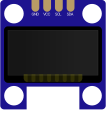
SSD1306 OLED Display
Monochrome OLED display controller
Note
The
I2Caddress is0x3C
The SSD1306 is a popular monochrome OLED display controller commonly used with small displays such as 128×64 pixels.
It is widely adopted in embedded systems due to its sharp contrast, low power consumption, and flexible communication interfaces.
Datasheet
Section titled “Datasheet”The SSD1306 datasheet provides detailed information about:
- Electrical characteristics
- Command set
- Display memory mapping
- Initialization sequences
- Timing diagrams
Most OLED modules built around the SSD1306 strictly follow this specification, regardless of vendor.
Initialization
Section titled “Initialization”On a typical SSD1306, an initialization sequence is required because the internal registers may contain undefined values after power-up.
In the simulated version, the device starts from the reset-circuit default state as defined in the datasheet. This means it begins in Horizontal Addressing Mode, with the contrast set to 0x7F. All address pointers are reset to 0, and the display is not in sleep mode.
Communication Interfaces
Section titled “Communication Interfaces”The SSD1306 supports i2c, configured via hardware pins:
- Uses
SDAandSCL - Device address is
0x3C - Simplest wiring, slower than SPI
Display Memory Layout
Section titled “Display Memory Layout”The SSD1306 uses GDDRAM (Graphic Display Data RAM):
- Memory is organized into pages
- Each page is 8 pixels tall
- One byte controls a vertical column of 8 pixels
- 8 pages × 128 columns
- Total memory: 1024 bytes
Peripherals & Simulation Notes
Section titled “Peripherals & Simulation Notes”The SSD1306 is supported with a focus on accurate rendering and protocol behavior.
Unsupported Commands
Section titled “Unsupported Commands”Most SSD1306 Commands are supported including scrolling and different addressing modes and sleep mode except of the following commands.
| Command Function | Description |
|---|---|
set_segment_remap | Configures the segment remap (addressing direction for columns) |
set_multiplex_ration | Sets the multiplex ratio used by the display |
set_com_output_scan_dir | Controls the COM output scan direction |
set_display_offset | Sets the vertical display offset |
set_com_pins_config | Configures COM pins hardware configuration |
set_display_clock_ratio | Sets the display clock divide ratio and oscillator frequency |
set_precharge_period | Configures the pre-charge period for the display |
set_charge_pump | Enables or disables the internal charge pump |
set_vcom_level | Sets the VCOMH deselect level |
Limitations
Section titled “Limitations”- Animations might be slow, especially if there is a high frame rate. As a standard, maximum frame rate before having any issues should be 45 FPS.
Examples
Section titled “Examples”Here is an example for SSD1306, where MCU scans for valid addresses, prints them via RTT host and finally send an owl image to SSD1306
Your Help!
Section titled “Your Help!”We are actively expanding display and peripheral support.
Have feedback or want a feature prioritized? Join the discussion on discord and help guide future updates.